

Parks on the Air is hiking plus ham radio. You drive to a qualifying park, set up your station from a picnic table or a trailhead, log enough contacts to validate the activation, and submit the log to a website that tracks the rest. It is the easiest path from "I have a license and a handheld" to "I am operating a portable station in interesting places."
This guide covers the VHF and UHF side of POTA, the part you can do today with a Technician license and the radio you bought last month. I will not pretend the handheld POTA experience is the same as a General-class operator running an HF station from a mountaintop, it is not. But it is real POTA, it counts for awards, and it is the door that gets most new activators outside.
If you have not bought a radio yet, the Baofeng UV-5R at $17.16 is the cheapest credible POTA starter. If you already own a handheld, you can skip the gear section and head straight to the activation walkthrough.
What POTA Actually Is
Parks on the Air was launched in 2017 by a group of hobbyists who wanted to encourage portable operation and public-lands appreciation at the same time. It is not run by the ARRL or any government agency; it is a free, volunteer-managed program with a public website (pota.app) where activators announce their plans, hunters watch the live spot list, and everyone uploads logs after the fact.
The program covers tens of thousands of qualifying parks across the US, Canada, and most other countries with active ham communities. Each park has a reference number (a string like K-0036 for the US national park system) that becomes the "address" of any activation. You will see those reference numbers everywhere in POTA conversations.
There are two roles:
- Activator. You travel to the park and operate from inside its boundary. Get ten valid contacts logged and the activation counts as "valid," which credits you and contributes to your activator awards. You can keep operating beyond ten if you want more contacts; many do.
- Hunter. You stay home (or in a car, or anywhere with a radio) and contact activators who are spotted on the live list. Each unique park you hunt counts toward hunter awards.
Both sides log the contact, both sides get credit. There is no points-per-contact difference between activator and hunter; the program rewards different patterns of participation through separate award tracks. Hunters who chase rare parks rack up unique-park totals; activators who work many activations climb activator leaderboards. You can do both, and most people eventually do.
POTA is free. No registration fee, no membership, no paperwork beyond creating a free pota.app account when you want to start submitting logs.
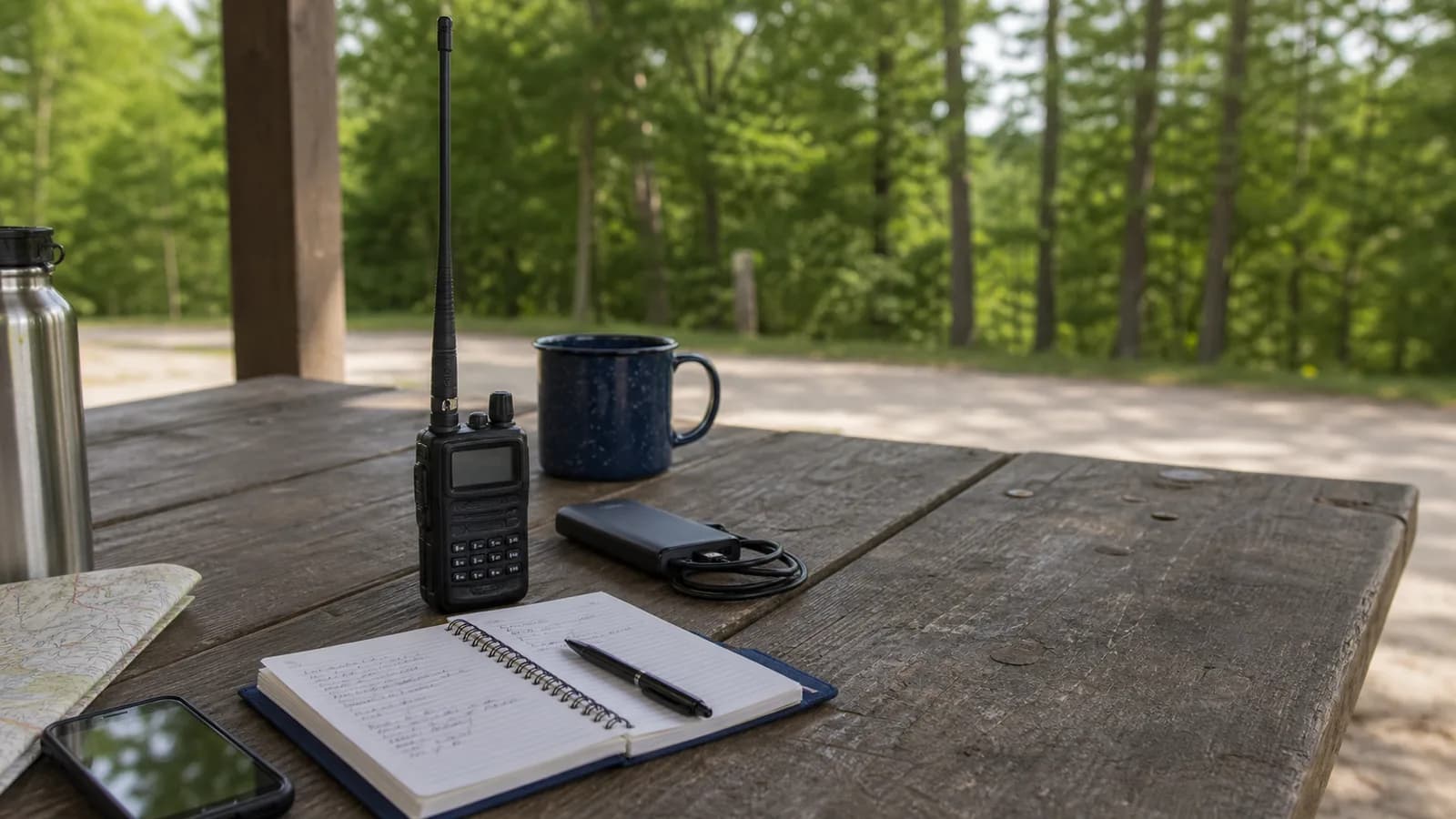
The Honest Version: Most POTA Is HF
If you spend any time watching POTA activations on YouTube or browsing the spot list on pota.app, you will notice that the overwhelming majority of activations are on HF, not VHF or UHF. Most activators set up a wire antenna and a 100-watt HF radio and work 20 meters or 40 meters all afternoon. That is the version of POTA most operators are referring to when they post photos.
Why does that matter for a beginner? Two reasons.
First, your Technician license does not include voice privileges on most HF bands. Until you upgrade to General, you are mostly limited to 6 meters, 2 meters, 1.25 meters, 70 centimeters, and other VHF/UHF bands for voice. POTA absolutely allows VHF/UHF activations, but you will be operating in a smaller pool of activators and hunters.
Second, VHF/UHF range is line-of-sight, and on the ground it has to be simplex. POTA's rules are explicit: "Land repeaters are not allowed: Contacts made via land repeaters are not permitted." So every QSO you log has to be radio to radio, your five watts reaching their station directly. From a mountaintop park you are talking straight into hundreds of square miles of houses with antennas on them. From a valley-floor park with trees on every side, you might struggle to make ten. Park selection matters far more on VHF than it does on HF.
I want to be straight about this, because the repeater shortcut is the thing most new activators assume they can use. You can still key up the local machine; you just cannot log the contact you make on it. What you do instead is announce there and move: get on the club repeater, say you are activating a park and you will be on 146.55 simplex, then go work the people who follow you over. That is legal, it is standard practice, and POTA's own activator guide spells it out: "You can use local repeaters to announce your activation once you get to your park. However, contacts via repeaters do not count for credit. Use simplex modes if you want to use VHF or UHF bands as part of your activation."
The right framing for a new POTA activator on a Technician license:
- Activate with what you have. A UV-5R from a genuinely good vantage point can work an activation.
- Pick parks that favor simplex: elevation, and a clear horizon toward where people actually live.
- Announce on a repeater or a club net, then move the contact to simplex. Only the simplex QSO goes in the log.
- Expect ten simplex contacts to take real effort. Spot yourself on pota.app, tell your club you are going, and give it a couple of hours.
- If you fall in love with POTA, the cleanest upgrade is your General license plus an HF setup, not a bigger handheld.
That said, plenty of activators stick with VHF/UHF for life. The kit fits in a backpack, the hike-in is easier, and the activations feel more like outdoor sport than like setting up a field station.
Activator vs. Hunter: Which to Start With
Hunting is the lower-friction entry point. You sit at home or in your car, you tune to a frequency that an activator has spotted, you call, you log, you move on. You can hunt fifteen parks in a Saturday morning without leaving your kitchen. It is also the best way to learn how a clean POTA QSO sounds before you have to run one yourself.
Activating is harder but more rewarding. You drive somewhere new, you set up portable, you take the lead on the frequency, you handle the small chaos of multiple stations calling you at once. Your first activation will probably feel awkward. Your fifth will feel routine. That progression is the whole point.
My recommendation for a brand-new POTA participant:
- Hunt three to five activations. Watch the pota.app spot list for anyone within simplex range of you and answer their call. Get a feel for the rhythm: how an activator opens, what hunters say, how short the exchange really is.
- Pick a nearby park with some elevation and a populated horizon, and plan a first activation.
- Activate. Do not stress about hitting some ideal contact count; ten valid contacts is the threshold, anything beyond that is a bonus.
- Submit the log. Look at the spots map. Hunt something else. Plan the next activation.
What You Actually Need
The "POTA budget" question can spiral. Here is what is actually required versus what is a nice upgrade.
Required:
- A Technician license. Your call sign in the FCC ULS database.
- A handheld radio. Any analog VHF/UHF dual-bander, with simplex channels programmed in alongside your local repeaters.
- A way to log contacts. Pen and paper is fine; a phone app is faster.
- A pota.app account. Free.
Strongly recommended:
- An upgraded antenna. The Nagoya NA-771 at $20.98 is the standard, well worth the spend.
- A backup battery or a USB power bank. POTA activations run longer than you expect; one battery is the difference between finishing and bailing.
- A small folding table or a clipboard for the log. Trying to write while squatting on a rock gets old.
Nice to have once you know you like POTA:
- A longer folding antenna for hard-to-reach parks. The Abbree AR-152 at 42 inches gives real range improvement over a stock duck for $9.99.
- A DMR-capable handheld for activators who want digital modes and APRS in the field. The AnyTone AT-D878UVII Plus is the one most field operators reach for. Note that DMR helps you on simplex only; working a DMR repeater or a hotspot puts the contact through infrastructure, and POTA will not count it.
You do not need any of this to start:
- A computer in the field
- Mast or tower
- Generator
- Dipole or fan dipole (great if you have HF; irrelevant on VHF/UHF handheld)
- A truck full of gear
The minimalist POTA activator runs a handheld, a Nagoya whip, a spiral notebook, and a granola bar. That is enough.
Choosing Your First Park
Three factors matter for VHF/UHF activations: elevation, the population inside your simplex footprint, and accessibility. Get those right and your first activation will be straightforward.
Elevation. A park with even a few hundred feet of elevation over the surrounding area will out-perform a flat valley park dramatically. VHF is line-of-sight; height directly converts to range. If your local parks options include a low ridgeline park and a flat lakeside park, take the ridge.
People inside your footprint. Simplex contacts come from operators sitting at home with a radio on, so what you need is line of sight to suburbs, not to wilderness. A ridge overlooking a metro area of 100,000 people is a far easier activation than a remote summit with a better view. Look up the local repeater list on RepeaterBook anyway: not to work through those machines, which POTA does not allow, but because an active club repeater tells you there is a population of licensed operators in range, and it gives you somewhere to announce the activation before you move to simplex. Our ham radio setup guide covers RepeaterBook and the CHIRP import workflow if you have not done that step yet.
Accessibility. Your first activation should be a park where you can park the car, walk five minutes to a usable spot, and not have to navigate three miles of trail with gear. The romantic image of the summit activation is great, but a state park with a picnic-table view of the valley is a better first run.
Look up the candidate park on pota.app. Check its reference number (you will need this for the announcement and the log). Look at the activation history; a park that has been activated dozens of times has a known caller community, which means the hunters will recognize the reference number and show up. A never-activated park is more novel but harder.
For a first activation I would actively avoid:
- Dense forest with no view of the horizon
- Urban parks with overhead power lines
- Parks at the bottom of a steep valley
- Parks more than an hour's drive away (logistics overhead)
- Parks where you would need a permit for anything other than visiting
State parks, national forest day-use areas, and national monuments tend to be the easy mode. National parks themselves vary; some are POTA-friendly, some have restrictions on equipment that you should check before showing up.
Featured Setup Picks
Three radios cover the realistic spectrum of POTA handhelds, plus two antennas worth the spend.
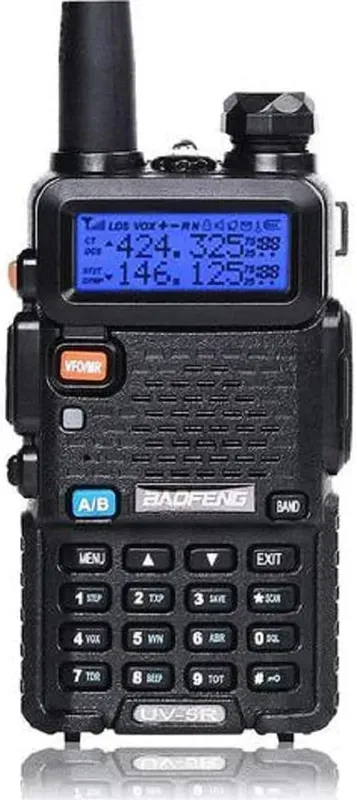
The default first POTA radio. A $17.16 dual-bander with five watts on high, fully CHIRP-compatible, with a community so large that any problem you hit has been answered ten thousand times. Beginner score 89, the highest in our catalog, mostly because of that community. The full Baofeng UV-5R review covers what it does and does not do.
Tradeoffs: the stock antenna is mediocre, the battery is only 1,800 mAh (you will want a backup for any activation over an hour), and the chassis feels every bit of its price tag. You will outgrow it. But you will learn POTA on it cheaply, and that learning transfers to any handheld you buy next.
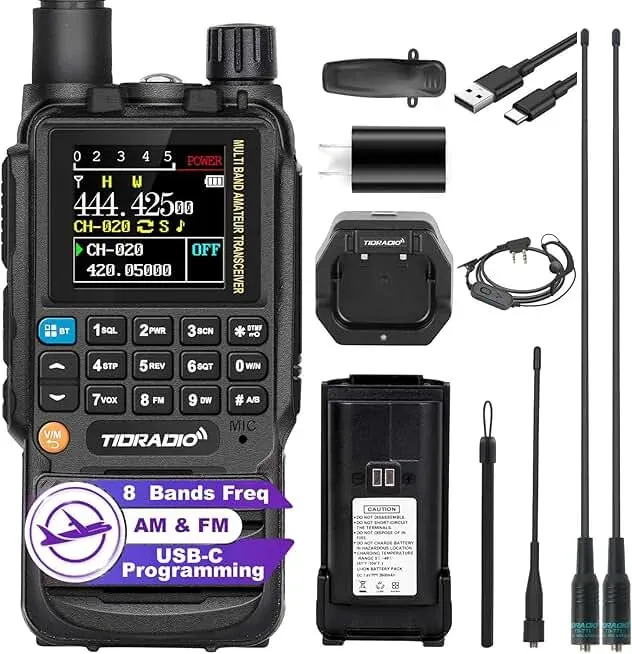
The modern alternative. USB-C charging, a 2,500 mAh battery, a cleaner display, and TIDRADIO actually pushes firmware updates. About double the price of a UV-5R but solidly in the budget tier. The TIDRADIO TD-H3 review has the field detail.
The reason to pick this over the UV-5R for POTA specifically: the battery. You can charge it off a USB-C power bank in the field instead of carrying a proprietary cradle, and the extra capacity actually shows up in activations longer than an hour. CHIRP support is more limited than the UV-5R, but for analog FM POTA work, that does not matter.
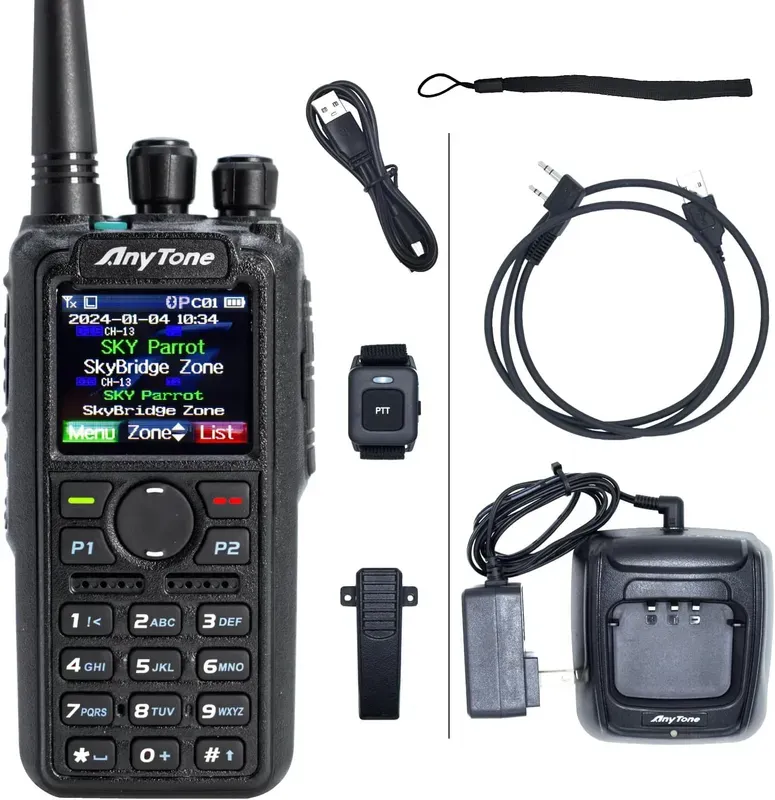
The activator's choice once you know you are sticking with the hobby. Overall score 83, a couple of points off the top of our DMR handheld board. Seven watts on high, 3,100 mAh battery, DMR plus APRS plus GPS. APRS in particular pays dividends in the field: you can beacon your position so other operators see where the activation is happening, and you can send short text messages without needing a voice contact. The full AnyTone AT-D878UVII Plus review covers the steep menu system and what makes it worth the money.
Tradeoffs: the menus are genuinely dense, the codeplug for DMR takes an afternoon to set up the first time, and the official CPS is not CHIRP-compatible. None of that matters if you are committed to the hobby. All of it matters if you are not sure yet.
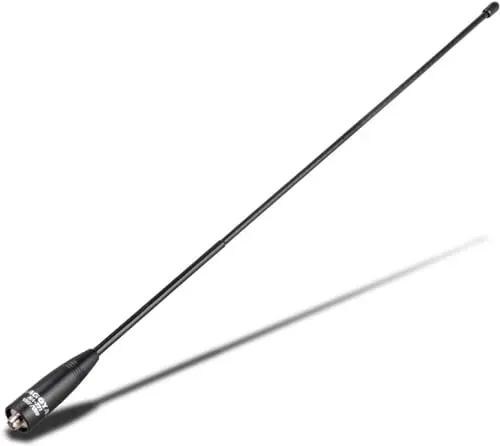
The standard antenna upgrade. A 15.6-inch flexible dual-band whip with 2.15 dBi gain on 2 meters and 3.0 dBi on 70 centimeters. It screws straight onto any Baofeng-style SMA-Female radio (the UV-5R, TD-H3, AT-D878UVII Plus, and most other budget Chinese handhelds). For Yaesu and other SMA-Male radios, the Nagoya NA-771 SMA-Male is the same antenna with the opposite jack. Our best ham radio antennas roundup compares it against the rest.
In the field, the NA-771 gives you a meaningful range improvement over the stock duck. Not magic, but enough that a marginal-signal contact you would have missed with the stock antenna gets logged with the Nagoya. For $20.98, it is the highest-ROI POTA upgrade.
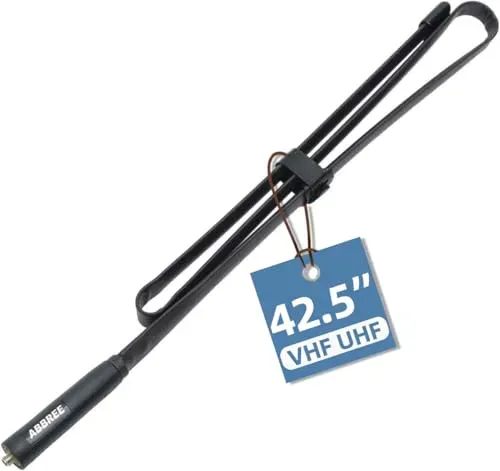
The longer reach when the NA-771 is not enough. A 42-inch folding tactical whip with 5 dBi of gain. It folds compactly enough to slide into a backpack pocket, then unfolds to a real piece of antenna. The reach is noticeably better than the NA-771, especially on 2 meters; the tradeoff is awkwardness when you are walking around with it deployed.
For an activator who wants more range without leaving the handheld world, the AR-152 is the second upgrade. Pair it with a longer counterpoise (a piece of wire roughly a quarter wavelength) clipped to the chassis ground and you have a portable station that punches well above its weight class.
How to Run Your First Activation
Walk-through, in the order the day actually happens.
Night before. Decide on the park. Find its reference number on pota.app. Pick your simplex frequency: POTA's rules do not name one, but the convention on 2 meters is to call on 146.520 MHz, the national calling frequency, and then move the activation to a nearby simplex channel such as 146.55 or 146.58 so you are not camped on the calling frequency for two hours. Charge your radio. Pack a backup battery, water, the antenna upgrade, a notebook, a pen, a charged phone, and snacks. Tell someone where you are going and when you expect to be back. Glance at the weather.
Morning of. Drive to the park. Arrive earlier than you think you need to. Spend ten minutes walking around to find a vantage point with sky visible to the horizon in at least two directions; that is where your signal goes farthest. Set up at a picnic table, on the tailgate of your car, or on the ground next to a fallen log. Anywhere stable.
Spot the activation. On pota.app, log in and click "Spots → Add Spot." Enter the park reference, your call sign, the simplex frequency you plan to operate on, and "POTA Activation" or similar in the comments. This puts you on the live list that hunters watch. The rules only say you may self-spot, but on VHF treat it as mandatory in practice. Nobody is going to stumble across you on 146.55 by accident, so if you skip this step you will most likely sit there calling into an empty band.
Announce, if you have somewhere to announce. Key up the busiest local repeater, wait for a gap, and say you are activating the park and will be listening on your simplex frequency. This is explicitly allowed. The POTA activator guide says you can use local repeaters to announce an activation, and that contacts via repeaters do not count for credit. So the announcement happens on the machine, and the QSO happens on simplex. A club net that meets on a weekday evening is even better: ask the net control the week before whether anyone wants to work a park on Saturday morning.
Open the activation. Tune to your simplex frequency and listen first. When clear, press PTT and call:
"November zero alpha bravo charlie, portable, activating Park reference K-zero zero three six, looking for POTA contacts, simplex."
Release PTT. Wait fifteen to thirty seconds.
If nothing comes back, call again. Then re-spot on pota.app with the current frequency and time, go back to the repeater and remind people you are still on, and try a different simplex frequency or a different band. Moving 20 feet to a spot with a cleaner horizon is often worth more than another five minutes of calling. The spots system is how hunters find you; keep it current.
Working contacts. When someone calls back, they will say something like:
"November zero alpha bravo charlie, this is Whiskey Bravo zero X-ray X-ray Yankee."
Respond:
"Whiskey Bravo zero X-ray X-ray Yankee, thanks for the contact, I am [first name] in [city], you are five-nine here in K-zero zero three six. What is your name and location?"
They give you their name, location, and signal report. You write down (or tap into your phone): their call sign, the time in UTC, the frequency, and any name or notes. Move to the next caller.
POTA exchanges are short. You do not need to discuss antennas, weather, or the recent solar cycle. Get the contact, log it, move on. Hunters often wait their turn in a pileup; respect their time by keeping individual contacts under thirty seconds.
Stay until you have ten or more. The rule is "a minimum of 10 QSOs from a park in the designated list within a single UTC day," so contacts you make either side of 0000Z belong to different activations. Most experienced activators stay past ten when conditions are good. There is no upper limit, though on a handheld running simplex you should treat ten as the goal and anything beyond it as a good day.
Close out. When you are done:
"November zero alpha bravo charlie, portable, closing the activation, thanks all, seven three."
Take down the antenna, pack up, leave the spot cleaner than you found it. Pack out everything you brought in, including ribbon ties and tape.
Log submission. Get home (or to the car). POTA takes ADIF files, not spreadsheets, so transcribe your paper log into your logging app and export an .adi file. The required fields are short: your call sign, their call sign, the date and time in UTC, the band, and the mode (FM for most VHF/UHF work). Upload it from the "My Log Uploads" page on pota.app. The system validates it and credits the activation usually within a day.
If you used a phone app like HAMRS or Ham2K, the ADIF export is one tap and you can skip the transcription entirely.
Logging Without Overthinking It
You have three reasonable options.
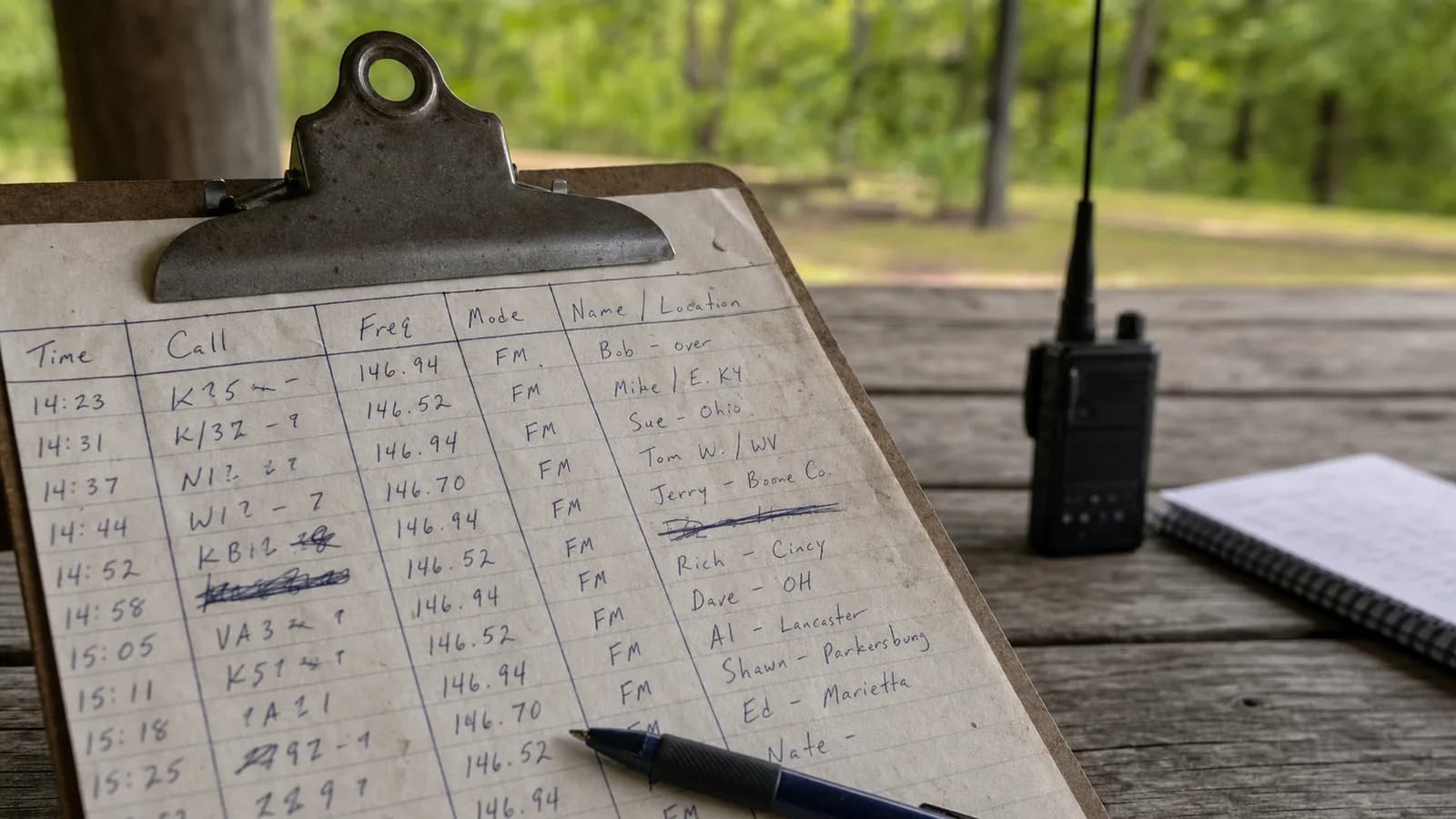
Paper. A spiral notebook, a pen, and discipline. Write the columns at the top of the page: time, call, freq, mode, name/location. Fill them in as contacts come. Type it into a logger and export ADIF at home. The advantage is that paper does not run out of battery; the disadvantage is the transcription step.
Phone app. Ham2K Portable Logger, HAMRS, or one of the handful of others. You tap or type each contact, the app auto-stamps the time and your GPS, and it exports a pota.app-ready ADIF file at the end. Most active POTA operators are on phone apps now; the workflow is materially faster.
Computer. Only practical if you brought a laptop, which on a VHF/UHF handheld activation is overkill. Skip this unless you are doing a planned multi-band field day.
The minimum log fields are: your call sign, the call sign of the contact, the date and time in UTC, the band, and the mode. The park reference goes on the upload. Names and signal reports are conventional but not required by the system; POTA does not mandate any particular exchange. Times must be UTC, and the most common rookie mistake is logging in local time and not converting.
Things That Will Trip You Up
No one answers your first call. This is the normal VHF experience, not a sign that something is broken. Re-spot on pota.app with your current frequency and time, wait five minutes, call again. If it is still quiet, get on a local repeater and announce that you are on simplex, then go back and listen. What you cannot do is give up and work everyone on the repeater instead, because those QSOs will not count.
You forget your park reference number. Write it on a sticky note and put it on the radio. Or just on your hand. Activators get the reference wrong constantly.
Time zones. POTA logs are UTC. Convert before you submit. Or use a phone app and let it convert for you.
Somebody offers to relay a weak station. Say no, politely. POTA's rules require that "both stations hear each other clearly enough to accurately log their respective callsigns. Relays of callsigns, signal reports, park reference numbers, etc., are not permitted." A helpful third operator passing a call sign along for you invalidates the contact, and the rules say that station is "effectively playing the part of a land repeater." Ask the weak station to move, or work them later when they get to a better spot.
Logging the repeater contact anyway. The announcement on the local machine is fine. The QSO you make there is not. The upload cannot tell a repeater QSO from a simplex one, so nothing will reject it for you; it is on you to strike it, and if four of your twelve came through a repeater you are down to eight and the activation does not count. Keep two mental columns: repeater for arranging, simplex for logging.
Running out of battery. A UV-5R at five watts will burn through its 1,800 mAh battery in about ninety minutes of moderate transmit time. Bring a spare or a USB power bank.
Identifying every ten minutes. The FCC rule still applies in the field. Get into the habit of saying your call sign clearly at the start of each contact and at least once per ten-minute window. POTA exchanges naturally include the call, so this is usually self-correcting.
Park boundaries. You must be inside the park boundary while operating. Some parks are obvious; some have ambiguous edges. When in doubt, walk further in. The boundary rule is the most common reason an activation gets disqualified.
Weather and time of day. Mid-day in summer is the worst time to be standing in a hot field trying to log contacts. Mornings are cooler and propagation is often better on VHF. Evenings can be lovely but you risk losing daylight if you have a hike out.
Hunting: The Other Half of POTA
If activating sounds like more than you want to take on right now, hunt instead. You can do meaningful POTA participation from your couch.
The workflow:
- Open pota.app spot list on your phone or laptop. On VHF, filter for activations close enough that you could reach them simplex, which in practice means the same metro area or the same valley.
- When you see an activator spotted on a frequency you can reach, tune in and listen for the activation cadence.
- Wait for a clean break, then call: your call sign, then theirs, in NATO phonetics if the signal is rough.
- Exchange the contact: name, location, signal report. Write it down for your own records.
- Do nothing else. Hunters do not submit logs to POTA; only activators do, and your credit comes out of their upload. If the activator never uploads, chase them up rather than the help desk.
Hunter activity is the foundation that activators rely on. A spotted activation with no hunters listening is a frustrating activation, and on VHF simplex it is the difference between ten contacts and four. Show up for other operators' activations and they will show up for yours.
Active hunters can chase parks across the world depending on conditions, but on VHF/UHF you are mostly limited to local activations (or to extreme propagation events like 6-meter openings, which are a different article entirely).
What's Next After Your First Activation
You did your first activation. You logged ten contacts, you submitted the log, you got the green check on pota.app. What now?
- Activate again. Different park. Different time of day. See how conditions vary.
- Upgrade one piece of gear. The Nagoya antenna if you have not yet, or the Abbree AR-152 if the Nagoya is in. Power bank if your batteries are stressing you out. Phone logger if you were on paper.
- Hunt more. A few hundred logged hunts and you start seeing patterns: which activators are reliable, which parks are popular, which times of day work for your location.
- Plan a destination activation. Pick a park that needs a real drive or a real hike. Make a day of it.
- Eventually: upgrade to General. Once you have a feel for VHF/UHF POTA and you are considering HF, the General license is your next step. Our how to get your ham radio license guide covers the upgrade path. Then a budget HF rig like a Xiegu or a used IC-7300 puts you in 100-watt activator territory.
POTA is durable in a way few hobbies are: there are always more parks, conditions change daily, and the community is enormous and patient with newcomers. The activator certificate for your first valid activation lands in your email within a day of submission. Keep going.