

FT8 is a digital mode that lets two ham radio stations complete a contact using signals far too weak to hear. Your radio sends a short, structured message every 15 seconds, free software on your computer decodes the signals it can find in the passband, and a complete contact takes about a minute and a half. Its designers describe it as accounting, by some measures, for a large fraction of all ham radio activity on HF, and you can do it on modest power with a modest antenna.
This guide covers how FT8 works, the standard FT8 frequencies for every band, what equipment you need, and the reasonable criticisms of it. If digital modes are new to you, our overview of ham radio digital modes covers the voice side (DMR, D-STAR, Fusion); FT8 is a different animal, built for HF and weak signals rather than talk.
FT8 at a glance
FT8 is short for "Franke-Taylor design, 8-FSK modulation", after its designers Steve Franke (K9AN) and Joe Taylor (K1JT). It arrived in July 2017 in version 1.8 of WSJT-X, the free weak-signal program Taylor's team maintains, and it caught on worldwide almost immediately.
The numbers below come from the protocol paper Franke, Bill Somerville (G4WJS) and Taylor published in QEX in 2020.
| Parameter | FT8 |
|---|---|
| Transmit/receive cycle | 15 seconds, starting on :00, :15, :30 and :45 of every minute |
| Transmission length | 12.64 seconds (79 symbols of 0.16 seconds each) |
| Modulation | 8 tones, 6.25 Hz apart (continuous-phase FSK) |
| Occupied bandwidth | 50 Hz |
| Message size | 77 bits of information, plus a 14-bit error check |
| Error correction | LDPC (174, 91) forward error correction |
| Decoding threshold | about -21 dB signal-to-noise ratio, measured in a 2,500 Hz bandwidth |
| Software | WSJT-X (free, open source, GPLv3) and compatible programs |
That decoding threshold is the headline. A signal at -21 dB in a 2,500 Hz bandwidth is well below anything you could pick out by ear in an SSB receiver. FT8 gets there by sending very little, very slowly, with heavy error correction, at moments both stations agree on in advance.
How an FT8 contact works
Every FT8 transmission is a fixed, short message, and a contact is a sequence of them. Here is the example the designers use in their paper, between K1JT and K9AN:
- K1JT:
CQ K1JT FN20, calling CQ with a four-character grid locator. - K9AN:
K1JT K9AN EN50, answering with its own grid. - K1JT:
K9AN K1JT -10, a signal report in dB. - K9AN:
K1JT K9AN R-12, acknowledging ("R") and sending a report back. - K1JT:
K9AN K1JT RRR, confirming. Many operators sendRR73here instead, which combines the confirmation and the sign-off and saves a cycle. - K9AN:
K1JT K9AN 73, signing off.
The two stations alternate 15-second slots, one transmitting on the "even" periods and the other on the "odd" ones. That is why each exchange takes about a minute and a half, and why your computer's clock matters: WSJT-X expects it to be within about a second of UTC. A clock that is a few seconds off is one of the most common reasons a new FT8 station decodes nothing.
What FT8 does not carry is conversation. There is room for call signs, a grid square, a signal report and an acknowledgement, plus a free-text option of up to 13 characters. That is by design, and it is also the root of most criticism of the mode (more on that below).
Why it works when you cannot hear anything
Three choices in the protocol do most of the work.
- Narrow signals. Each FT8 signal occupies 50 Hz. A normal SSB passband of about 2,500 Hz holds dozens of FT8 signals side by side, and WSJT-X can decode dozens of them in a single cycle. You see them as short stripes on a waterfall display.
- Slow, simple modulation. Eight tones spaced 6.25 Hz apart, each held for 0.16 seconds, are easy to tell apart in noise, and the software knows exactly when each transmission starts.
- Strong error correction. Each 77-bit message is protected by a 14-bit check and a (174, 91) low-density parity-check code, so the decoder can rebuild a message even when many symbols are lost in noise or fading.
The trade-off is speed. FT8 gave up about 4 dB of sensitivity compared with the older JT65 mode, which used one-minute cycles and needed four minutes or more per contact. A quarter of the time per message turned out to be a much better deal for most operators.
FT8 frequencies
FT8 activity on each band clusters around one standard dial frequency. Set your radio to that frequency in upper sideband (USB) mode, and WSJT-X places your signal somewhere in the audio passband above it, typically between a few hundred and about 3,000 Hz. These are the defaults WSJT-X ships with for the bands a US amateur can use:
| Band | FT8 dial frequency (USB) |
|---|---|
| 160m | 1.840 MHz |
| 80m | 3.573 MHz |
| 40m | 7.074 MHz |
| 30m | 10.136 MHz |
| 20m | 14.074 MHz |
| 17m | 18.100 MHz |
| 15m | 21.074 MHz |
| 12m | 24.915 MHz |
| 10m | 28.074 MHz |
| 6m | 50.313 MHz |
| 2m | 144.174 MHz |
A few notes on the table:
- 20 meters (14.074 MHz) is a common first band during daylight, and 40 meters (7.074 MHz) after dark. Which band is open depends on time of day, season and the solar cycle, so watch which frequencies are decoding.
- 6 meters also has a second common frequency, 50.323 MHz, which WSJT-X lists for intercontinental contacts.
- 60 meters is left out on purpose. The US 60 meter rules changed in 2026 and now combine a 15 kHz segment with fixed channels, so check what is permitted on our ham radio band chart before transmitting FT8 there.
- The frequency is a convention, not a rule. Nothing in FCC rules reserves 14.074 MHz for FT8. It is where everyone listens, which is the point.
What you need to get on FT8
FT8 needs five things. You may already own most of them.
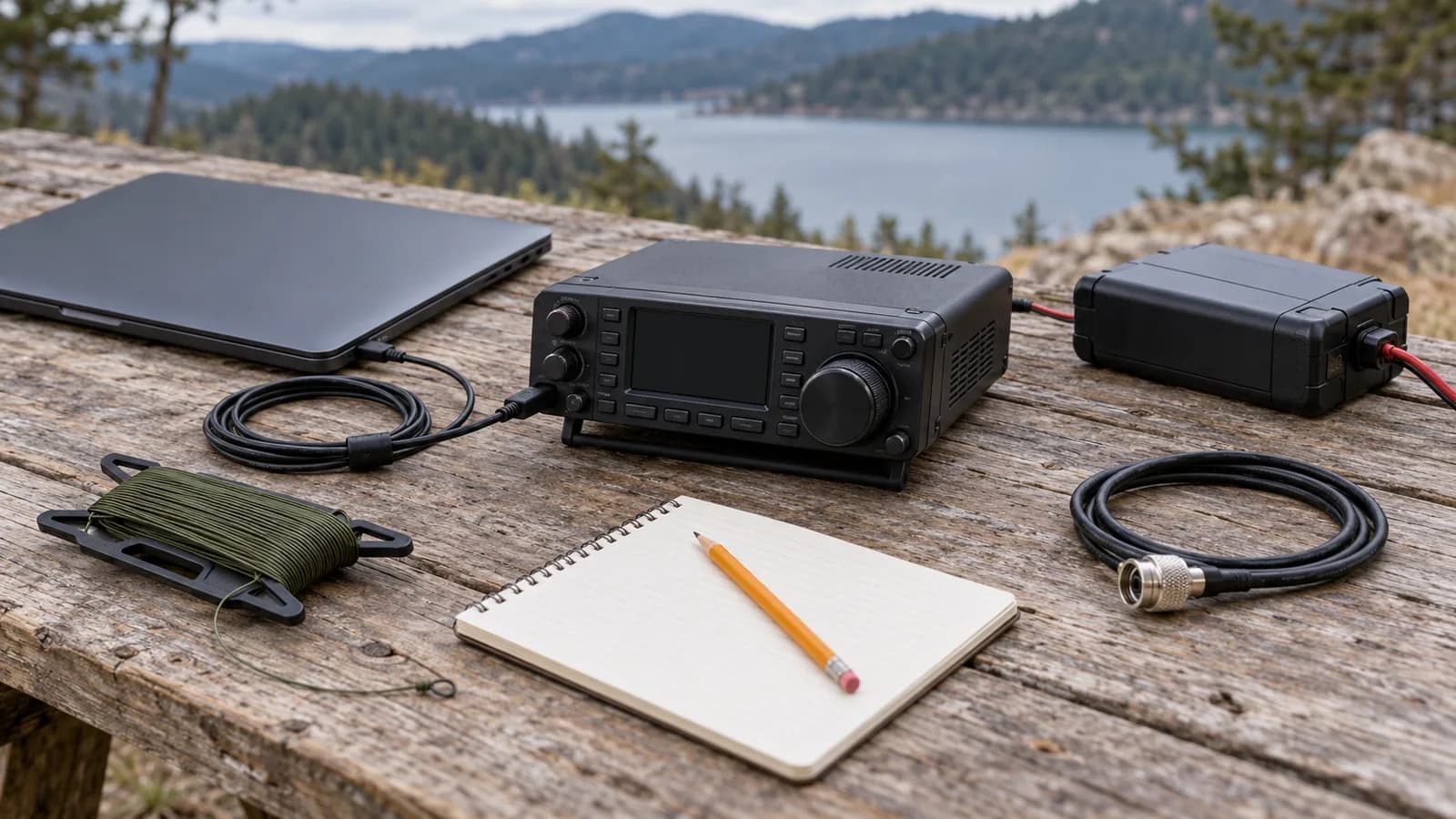
- A license that covers the band. A General license covers the FT8 frequency on every HF band in the table above, and Extra adds more spectrum elsewhere. Technicians can use FT8 too: their privileges include data modes on 10 meters from 28.000 to 28.300 MHz, which covers 28.074 MHz, and on 6 meters and 2 meters above the CW-only bottom 100 kHz of each, which covers 50.313 and 144.174 MHz. Our guide to license levels shows exactly what each class allows.
- An HF transceiver with SSB. Any HF rig with upper sideband will do. FT8 rewards modest power, and running well below a rig's maximum is normal on this mode. Our HF radio listings compare the rigs we track.
- An antenna for the band. A resonant wire antenna, such as a dipole for 20 or 40 meters, is a cheap and effective start. The dipole antenna calculator gives you the wire lengths, and the SWR calculator helps you check the match.
- A computer running WSJT-X. WSJT-X is free for Windows, macOS and Linux. It wants a sound device that runs at 48 kHz and 16 bits, and a way to key the transmitter.
- A connection between radio and computer. This is where radios differ most; see the next section.
The radio-to-computer connection
WSJT-X needs two paths to your radio: audio in both directions, and control (at minimum, a way to switch the transmitter on and off; ideally full CAT control so the software can set the frequency and mode).
There are two ways to provide them:
- Built-in USB audio. Many current HF rigs contain their own USB sound card. One USB cable carries audio in both directions plus rig control, and the computer sees the radio as a sound device and a serial port. You install the manufacturer's USB driver and nothing else.
- An external interface. Radios without USB audio need a small box between the radio's data or accessory jack and the computer. Yaesu's SCU-17 and the third-party Digirig are common choices; Xiegu's DE-19 does the same job for its radios and contains its own sound card, so it still needs only one USB cable to the computer.
This is how the HF radios we track handle it, from each manufacturer's manual or product page (and, for the Xiegu X6100 and G90, the manuals their US dealer publishes):
| Radio | One USB cable for audio and control? | What else FT8 needs | Price |
|---|---|---|---|
| Icom IC-7300 | Yes | Nothing beyond Icom's USB driver; has a one-touch FT8 preset | $1199.95 |
| Icom IC-705 | Yes | Nothing beyond Icom's USB driver; also has a one-touch FT8 preset | $1609.94 |
| Icom IC-7100 | Yes | Nothing beyond Icom's USB driver | $1049.95 |
| Yaesu FT-991A | Yes | Nothing beyond Yaesu's driver; appears as "USB AUDIO CODEC" | unavailable |
| Yaesu FTDX10 | Yes | Nothing beyond Yaesu's driver; has a one-touch FT8 preset | $1699.95 |
| Kenwood TS-890S | Yes | Nothing beyond Kenwood's driver | $4699.95 |
| Xiegu X6100 | Yes | Nothing beyond the CH342 driver | $505.75 |
| Xiegu X6200 | Yes | Nothing beyond the CH342 driver; also has an on-radio FT8 decoder app | $664.05 |
| Yaesu FT-891 | No, USB is rig control only | An audio interface on the data jack, such as the SCU-17 or a Digirig | $809.95 |
| Xiegu G90 | No | Xiegu's DE-19 interface or similar | $420.00 |
| Xiegu G106 | No | Xiegu's DE-19 interface or similar | $236.55 |
If you are buying a radio with FT8 in mind, built-in USB audio is the feature that saves you money and a tangle of cables. Three of the radios above suit different stations particularly well.
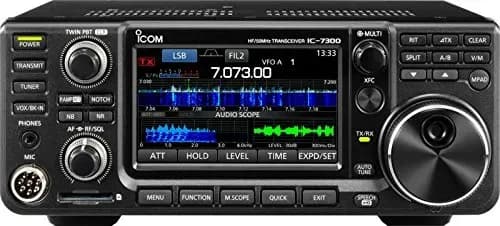
The IC-7300 is the default home-station answer for FT8: one USB cable, a one-touch FT8 preset, and 100 watts available, though you will run far less on digital. Its manual names FT8 explicitly as something you can operate with a PC over that one cable.
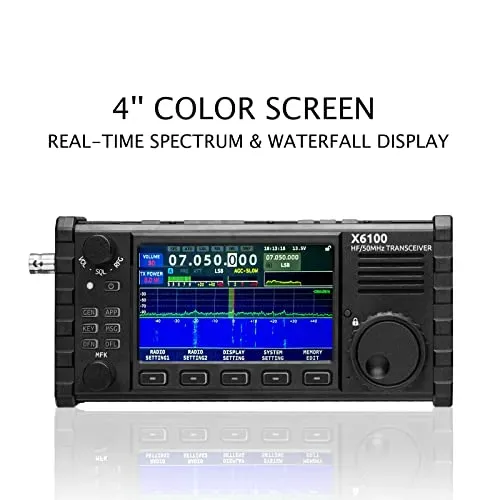
The Xiegu X6100 is the budget portable route, at $505.75. It has USB audio built in, so a laptop and one cable make a complete field station, and a battery for operating away from mains power. Its output is 10 watts on external power and 5 on the internal battery, which suits FT8 well.
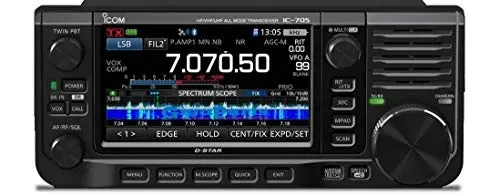
The IC-705 is the premium portable option: USB audio and control over one cable, the same one-touch FT8 preset as the IC-7300, and 10 watts on external power (5 on its own battery). Its size and battery make it a natural fit for FT8 from parks and summits.
Setting up WSJT-X, briefly
Once the radio and computer are connected, the setup follows the same pattern on any station:
- Sync your clock. Use your operating system's internet time service, or a dedicated time-sync tool, and confirm the clock is within a second of UTC.
- Configure the radio in WSJT-X. Choose your rig under the radio settings so WSJT-X can control frequency and transmit, and pick the radio's audio device as both input and output.
- Set the radio to USB and select the FT8 band from WSJT-X's frequency list.
- Set audio levels. Adjust the receive level so WSJT-X shows a moderate noise level, and set the transmit audio so the radio produces full output for the power you choose without driving the radio's ALC. Overdriving the audio splatters your signal across other FT8 users.
- Listen first. Watch a few cycles, click a CQ you can decode, and let WSJT-X sequence the contact.
Power and duty cycle
FT8 is a constant-amplitude signal that transmits for 12.6 seconds of every 15-second slot you use, which is much harder on a transmitter than SSB voice. Check your radio's manual for its rating on continuous digital modes, and expect to run below the rig's maximum output. Some manuals are specific: Xiegu's X6200 manual says to keep data-mode power at 5 watts or less, and the G90 manual suggests about half of full output for FT8. You rarely need it anyway: FT8's sensitivity means a clean, moderate-power signal goes a long way when the band is open.
FT8 compared with other modes
| Mode | What you exchange | Time per contact | Weak-signal ability | What it needs |
|---|---|---|---|---|
| FT8 | Calls, grid, report, 73 | About 1.5 minutes | Down to about -21 dB | Radio, computer, WSJT-X, clock |
| FT4 | The same, twice as fast | About 45 seconds | About 3 dB less | Same as FT8 |
| CW | Anything, in Morse code | Operator's choice | Very good | Morse skill, any HF radio |
| SSB | Anything, by voice | Operator's choice | Needs a clear signal | Microphone, any HF radio |
FT4 is FT8's faster sibling, introduced in WSJT-X 2.1 two years after FT8. It halves the cycle to 7.5 seconds for contests and busy pileups, at the cost of about 3 dB of sensitivity. For everyday DXing, FT8 remains the default.
The criticism of FT8
FT8 is the most argued-about mode in ham radio, and the arguments are worth knowing before you start.
- It is not a conversation. A complete FT8 contact exchanges call signs, grids and reports and nothing else. Critics, including a much-read 2018 Hackaday article, argue that this reduces radio to a computer game. Supporters point out that it puts stations on the air who could not otherwise make contacts at all.
- The software does much of the work. WSJT-X can sequence a contact with a click. That is efficient, and it is also why some operators feel FT8 skills do not transfer to CW or SSB.
- It crowds the busy bands. When 20 meters is open, the FT8 segment can be packed wall to wall, and operators spread out onto nearby frequencies when it does.
- Occasional false decodes. To fit messages into 77 bits, some call signs are sent as short hash codes, and collisions occasionally produce a decode that names a station that is not there.
None of these are reasons not to try it. FT8 is one tool among many, and a station that can work FT8, CW and SSB has the most options when a band is marginal.